
Please note that this documentation is for the most recent version of this extension. It may not be relevant for older versions. Related documentation can be found in the documentation directory of the extension.
Coupons
With coupons, you can offer your customers targeted discounts and promotions in the checkout – for example, percentage discounts, fixed amounts, or time-limited promotions. On this page, you will learn how coupons are created and configured in the shop extension and how they can be redeemed in the ordering process. We also show you which settings for validity, conditions, and application in the shopping basket are important.
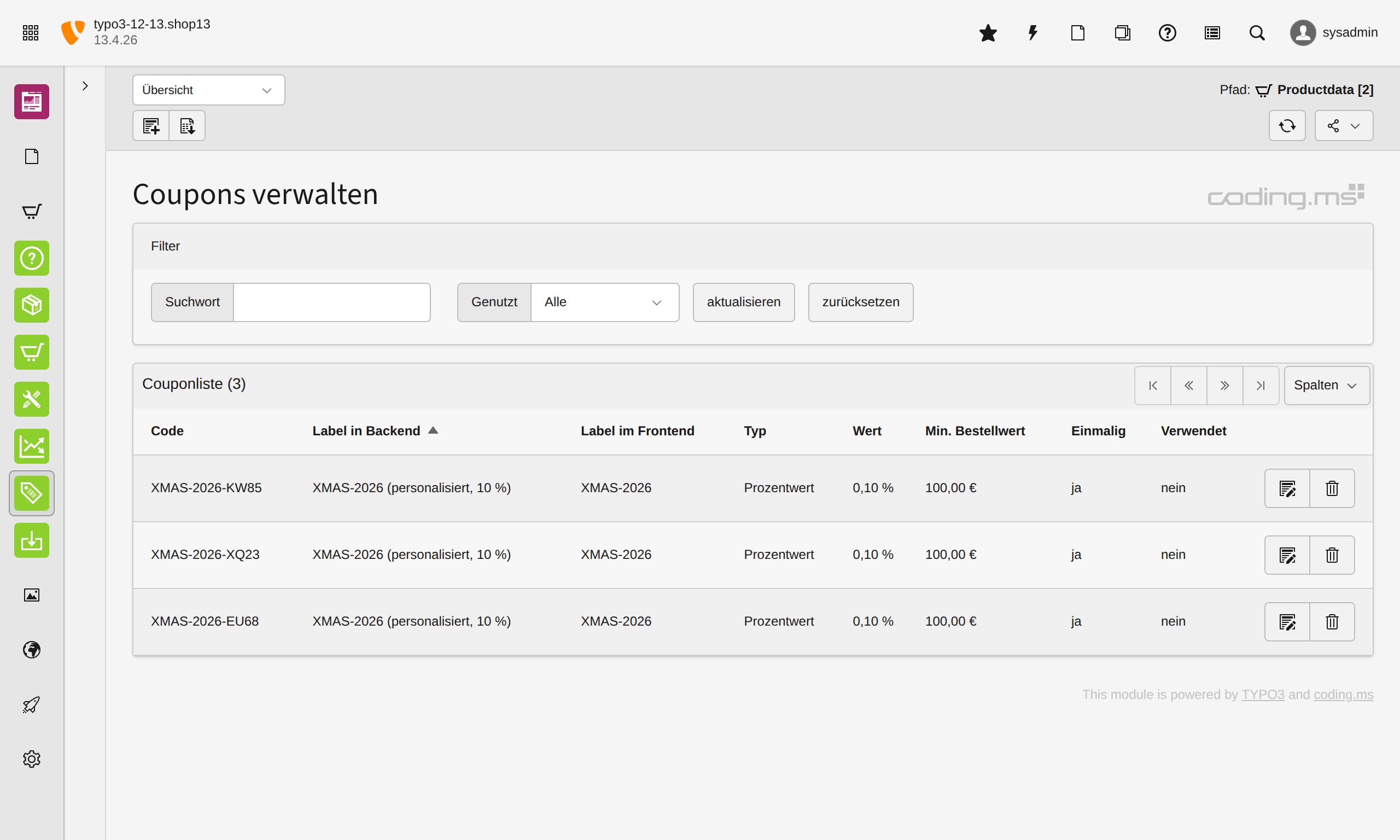
Example: Coupon "Regular 10%"
This coupon grants a percentage discount of 10% on the shopping basket and can be redeemed in the checkout using the code regular_10percent.
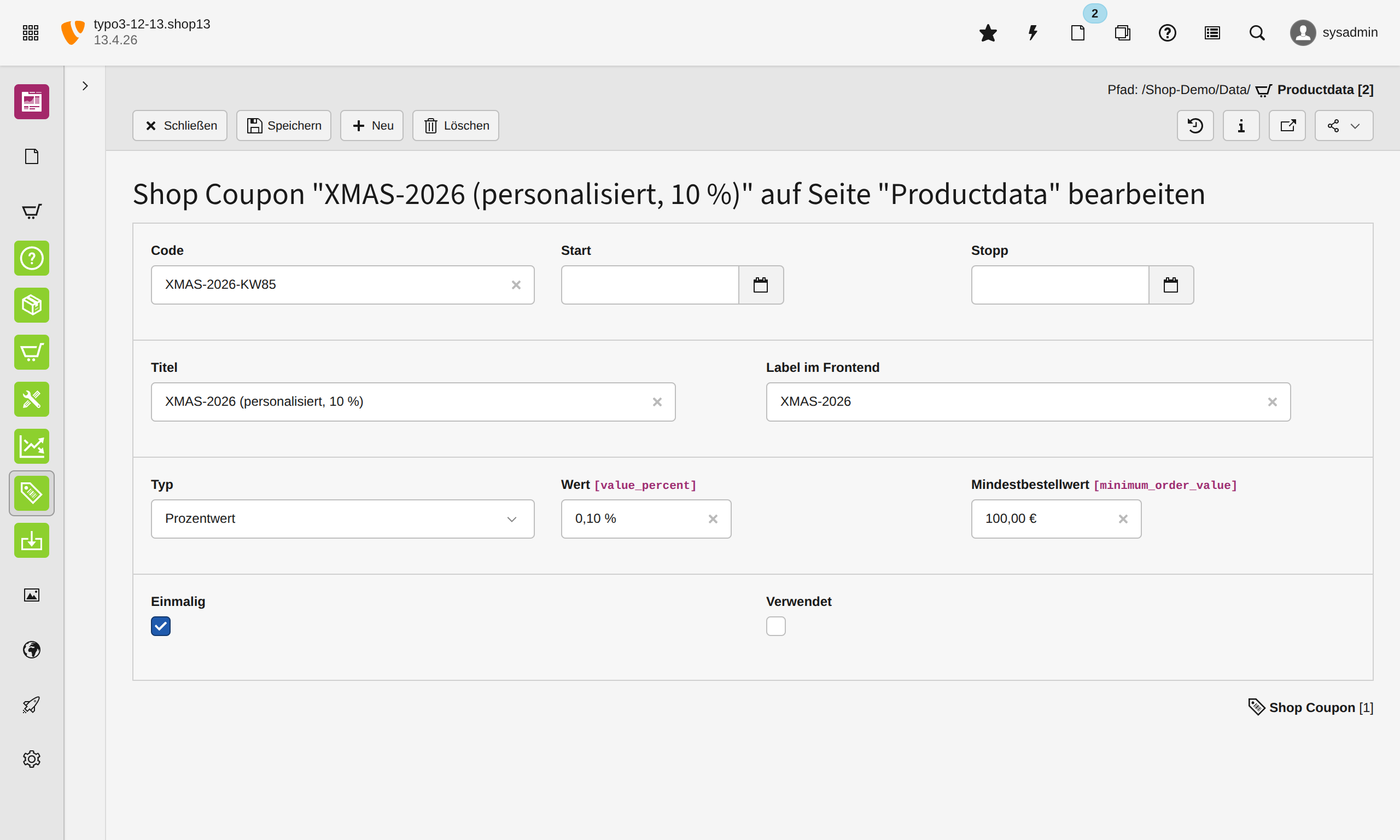
Configuration overview:
- Code:
regular_10percent- Unique code that the customer enters in the checkout.
- Label: Regular 10%
- Description of the coupon in the backend and intended for your identification.
- Label in frontend: Regular 10%
- Description of the coupon in the frontend for the customer.
- Type: Percentage discount
- The coupon reduces the order value by a percentage (alternatively, a fixed amount can also be set).
- Value in percent:
10.00 %- When redeemed, a 10% discount is calculated on the applicable shopping basket value.
- Minimum order value:
100.00 €- The coupon can only be redeemed if the minimum order value of €100 has been reached.
- Start / Stop:
empty- No start or end date is defined. The coupon is therefore not restricted in time (unless deactivated otherwise).
- One time: activated
- The coupon is limited to a single use. A discount code with deactivated One time could, for example, be used for an XMAS discount, which is sent to many customers in a newsletter.
- Used:
- This checkbox is activated as soon as the discount code has been redeemed. After that, it is no longer applicable to a shopping basket.
Behavior in the checkout: If a customer enters the code regular_10percent in the checkout, a discount of 10% is applied to the shopping basket if their basket value exceeds €100. Since there is no time limit, the coupon can basically be used at any time.
Creation Wizard for Coupons
With the Creation Wizard, you can automatically generate multiple coupon codes in one step. This is particularly practical for campaigns, newsletter promotions, seasonal discounts, or individual voucher series.
The codes are generated based on a freely definable pattern and directly created with the desired coupon settings (e.g., type, value, minimum order value, period).
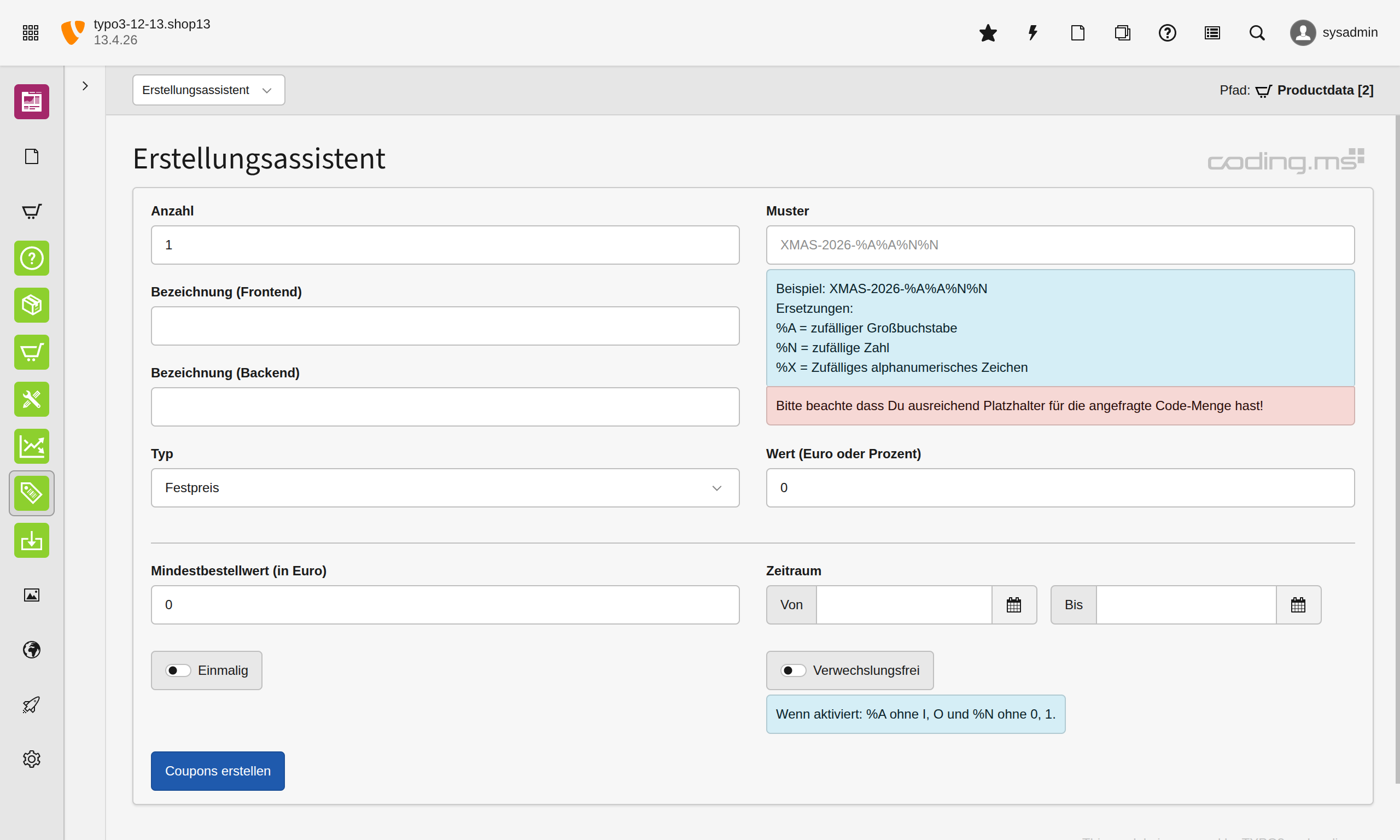
Fields in the Creation Wizard:
Creation wizard
- Quantity
- Number of coupon codes to be generated.
- Example:
1
- Label (Frontend)
- Public description of the coupon that can be displayed in the frontend.
- Example:
Christmas Promotion 2026
- Label (Backend)
- Internal description of the coupon for administration in the backend. This field helps you to organize coupon series or campaigns more easily.
- Example:
XMAS 2026 - Influencer Campaign
- Pattern
- Pattern for the automatic generation of coupon codes.
- Example:
XMAS-2026-%A%A%N%Ncould result inXMAS-2026-QP47
- The fixed text remains, placeholders are automatically replaced.
- Replacements:
%A= random uppercase letter%N= random number%X= random alphanumeric character (uppercase letter or number)Ensure that enough placeholders are used so that the desired number of unique codes can be generated.
- Type
- Defines the type of coupon, e.g.:
- Fixed value (fixed discount amount)
- Percent value (percentage discount)
- Defines the type of coupon, e.g.:
- Value
- Value of the coupon according to the selected type.
- For Fixed value: fixed discount amount
- For Percent value: percentage discount value
- Example:
10(depending on the type, e.g., €10 or 10%)
- Value of the coupon according to the selected type.
- Minimum order value (in Euro)
- Minimum order value from which the coupon can be redeemed.
- Example:
0 - The coupon is valid without a minimum order value.
- Period
- Defines the validity period of the coupon.
- From: Start date / start time of validity.
- To: End date / end time of validity.
- If no period is set, the coupon is not restricted in time (unless it is deactivated otherwise).
- One time
- If activated, the coupon can only be redeemed once.
- Unmistakable
- If activated, easily confused characters are excluded during code generation:
%AwithoutIandO%Nwithout0and1- This makes the codes easier to read and reduces typos in the checkout.
Example configuration:
- Quantity:
100 - Label (Frontend):
Christmas Discount - Label (Backend):
XMAS 2026 Batch A - Pattern:
XMAS-2026-%A%A%N%N - Type:
Percent value - Value:
10 - Minimum order value:
50 - Period:
01.12.2026to24.12.2026 - One time: activated
- Unmistakable: activated
Result: 100 unique coupon codes for a Christmas promotion are generated.
Tips for using coupons
In general, it is recommended to always set an expiration date for a coupon.
Scenario: A discount code that has less and less discount over a period of time.
You simply set up one discount code record per period, with the same code, but different discount values.
| Uid | Code | One time | Start time | End time | Discount |
|---|---|---|---|---|---|
| 1 | EarlyAccess2026 |
no | 2026-01-01 - 10:00 | 2026-01-10 - 10:00 | 30% |
| 2 | EarlyAccess2026 |
no | 2026-01-10 - 10:00 | 2026-01-20 - 10:00 | 20% |
| 3 | EarlyAccess2026 |
no | 2026-01-20 - 10:00 | 2026-01-31 - 10:00 | 10% |
This way you have a coupon code that has less and less discount the closer you get to a certain point in time.
More tips for coupons
- Use unique backend labels per campaign
- Use clear naming patterns like
XMAS 2026 - Newsletter - Batch AorLaunch Q2 - Influencer. - Simplifies later evaluation, support, and cleanup.
- Use clear naming patterns like
- Keep frontend label deliberately simple
- In the frontend, display short, understandable names like
Christmas Discountinstead of internal campaign names. - This appears more professional and avoids confusion.
- In the frontend, display short, understandable names like
- Restrict coupons by time as a standard
- Even for "permanent" promotions, it's better to set a period.
- Prevents old campaign codes from still working months later.
- Use minimum order value specifically
- Use minimum order values to keep discounts economically sensible.
- Example:
10 % from 50 €instead of flat rates on very small orders.
- Critically examine "One time" for public promotions
- For publicly shared codes (e.g., social media), "One time" is often unsuitable.
- Better to use for individual single codes / exclusive promotions.
- For mass promotions, use many individual codes rather than one shared code
- A common code (
SUMMER10) is simple but difficult to measure. - Individual codes per channel/partner make tracking and abuse control easier.
- A common code (
- Choose pattern with sufficient combination depth
- Patterns that are too short quickly lead to collisions.
- Example:
%N%N= only 100 combinations → unsuitable for larger campaigns.
- Activate "Unmistakable" for manual entry
- Particularly useful for codes from flyers, screenshots, social posts, or phone support.
- Significantly reduces typos (
0/O,1/I).
- Link code structure to campaign
- Prefixes like
XMAS-,BF-,WELCOME-help with support, debugging, and reporting. - Example:
WELCOME-%A%A%N%N%N
- Prefixes like
- Use separate code series per channel
- Instead of a single code, use separate series:
- Newsletter
- Partner A
- Partner B
- This way you can better see which channel is working.
- Instead of a single code, use separate series:
- Plan discount value and period together
- Higher discount = shorter period
- Lower discount = longer period
- This increases conversion pressure without permanently losing margin.
- Always check the coupon test-wise in the checkout before starting a campaign
- Test at least:
- valid code
- invalid code
- minimum order value not reached
- period not yet active / expired
- combination with shipping costs / taxes
- Test at least:
- Do not use coupons only for discounts
- Also useful for:
- free delivery
- partner/employee promotions
- reactivation of inactive customers
- fair/event codes
- compensation for problems (goodwill)
- Also useful for:
- Set expiration dates deliberately with time
- Not only the date, but define the exact time (e.g.,
23:59). - Prevents misunderstandings on the last day of the promotion.
- Not only the date, but define the exact time (e.g.,
- Clean up old coupon series regularly
- Archive/mark expired or used coupons.
- Keeps backend lists clear.
- Economically check discounts against shipping costs
- Particularly with low shopping baskets, a coupon + cheap shipping can strongly reduce the margin.
- Therefore, always consider coupon rules and shipping logic together.
- Use templates for recurring promotions
- Define a proven coupon setup as a reference (type, minimum value, period, label scheme).
- Saves time and reduces configuration errors.

TYPO3 Shop by coding.ms
An extensive shop for TYPO3 for realizing Webshops, Online-Shops or Payment-Subscriptions, comparable with tt_products, Cart or Aimeos. It includes PayPal, PayPal-Checkout, Klarna, Stripe, Bookmarks, UPS-API, invoice generation, a backend module, compare feature, graduated prices, plus product variants, filters, and tax and shipping logic for practical shop operations.