
Please note that this documentation is for the most recent version of this extension. It may not be relevant for older versions. Related documentation can be found in the documentation directory of the extension.
Customer Messages
Notice:
Available since version 5.16.0
The Customer Messages feature allows you to send individual email messages to customers directly from the TYPO3 backend. Within a basket order, you can compose and send an email to the customer with a pre-defined or custom subject and message body.
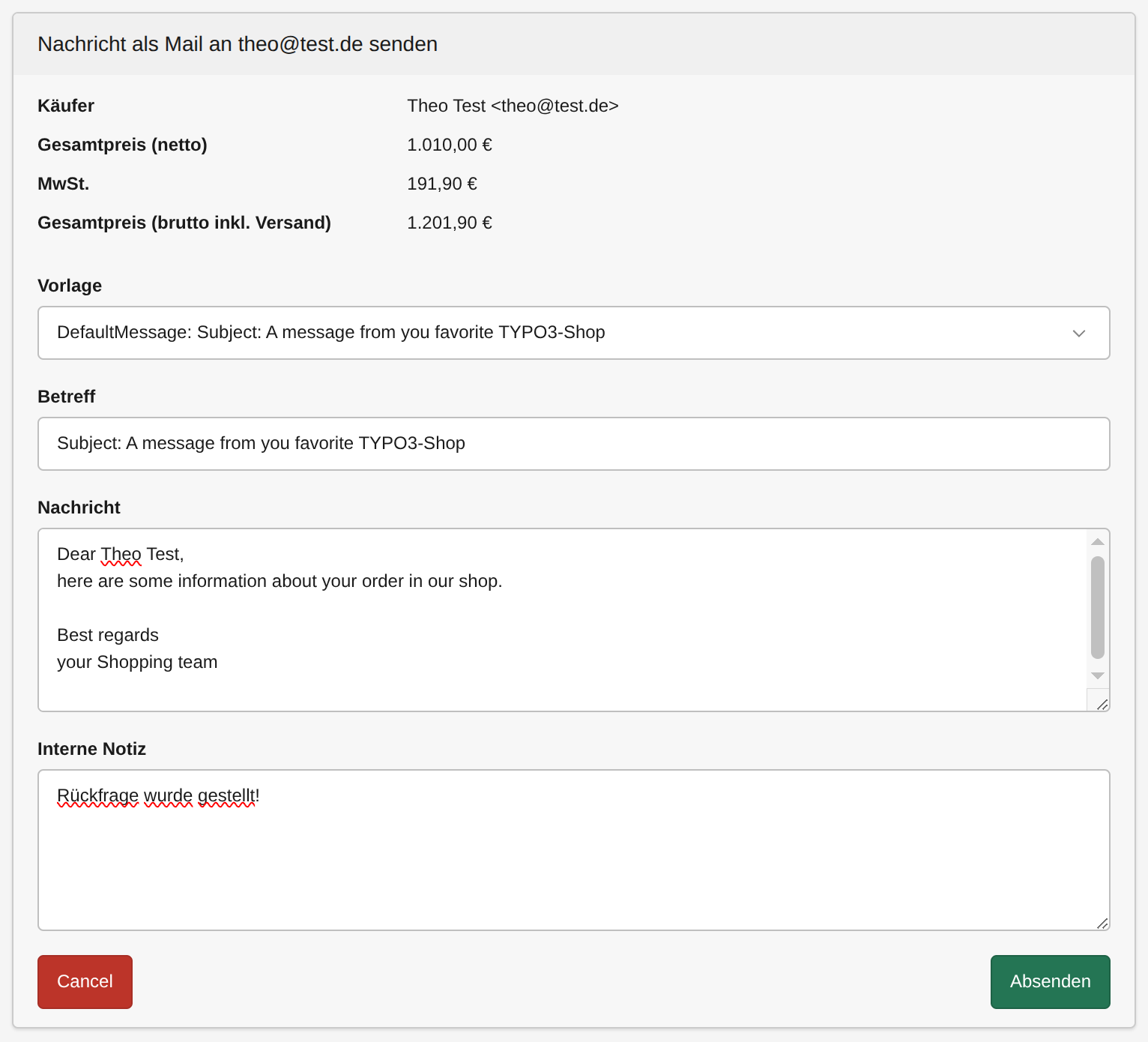
How it works
In the backend module for basket orders, each order provides a Send Message action. When you click on it, a form opens where you can:
- Select a message template from a dropdown – the subject and message fields are automatically pre-filled with the template content.
- Edit the subject and message before sending.
- If you're basket-order is already at least in state "ordered" you have the possibility to attach the invoice to the mail as well. This is useful for payment reminders.
- Send the email to the customer's email address associated with the order.
The message is rendered using Fluid, so you can use the {basketOrder} object to dynamically insert order-related information into your templates.
Message Templates
Message templates are simple HTML files located in the Email/ShopCustomer/Message/ subfolder of the configured templateRootPaths. The system automatically collects all files ending with Message.html and provides them as selectable templates in the backend.
Template file structure
- Line 1: The email subject line
- Line 2 to end: The email message body
Example template file (DefaultMessage.html)
Subject: A message from you favorite TYPO3-Shop
Dear {basketOrder.name},
here are some information about your order in our shop.
Our internal order number: ###UID###
Your order/invoice number: ###INVOICE_NUMBER###
Your postal-code: ###POSTAL_CODE###
Your tracking-number: ###TRACKING_NUMBER###
Best regards
your Shopping team
Available placeholders
The following placeholders are replaced with actual order data:
| Placeholder | Description |
|---|---|
{basketOrder} |
The full basket order Fluid object (e.g. {basketOrder.name}, {basketOrder.email}) |
{basketOrder.uid} |
The internal basket order number (UID) |
{basketOrder.invoiceNumber} |
The invoice number as a pure integer (for example 34) |
{basketOrder.invoiceNumberString} |
The invoice number as a formatted string (for example WS-2026-04-34) |
###POSTAL_CODE### |
The customer's postal code |
###TRACKING_NUMBER### |
The tracking number |
Overriding and adding custom templates
You can override existing templates or add custom ones by using the standard TYPO3 templateRootPaths mechanism. The paths are configured via TypoScript:
plugin.tx_shop {
    view {
        templateRootPaths {
            200 = EXT:shop/Resources/Private/Templates/
            400 = {$themes.resourcesPrivatePath}Extensions/Shop/Templates/
        }
    }
}
Templates in paths with a higher numeric index override templates with the same filename in paths with a lower index. This means you can place your custom templates in your site package and they will take precedence.
Adding a custom template
-
Create a new file ending with
Message.htmlin theEmail/ShopCustomer/Message/subfolder of one of your configuredtemplateRootPaths, for example:your_sitepackage/Resources/Private/Extensions/Shop/Templates/Email/ShopCustomer/Message/ShippingNoticeMessage.html -
The first line is the subject, the rest is the message body:
Your order has been shipped!
Dear {basketOrder.name},
your order ###INVOICE_NUMBER### has been shipped.
Your tracking number: ###TRACKING_NUMBER###
Best regards
your Shopping team- The new template
ShippingNoticeMessagewill automatically appear in the template dropdown in the backend.
File/folder structure
📂 Email
└─ 📂 ShopCustomer
   └─ 📂 Message
      ├─ 📄 DefaultMessage.html
      ├─ 📄 CustomMessage.html
      └─ 📄 ShippingNoticeMessage.html
Note: Only files ending with
Message.htmlare recognized as message templates. Other files in the folder are ignored.

TYPO3 Shop by coding.ms
An extensive shop for TYPO3 for realizing Webshops, Online-Shops or Payment-Subscriptions, comparable with tt_products, Cart or Aimeos. It includes PayPal, PayPal-Checkout, Klarna, Stripe, Bookmarks, UPS-API, invoice generation, a backend module, compare feature, graduated prices, plus product variants, filters, and tax and shipping logic for practical shop operations.