
Please note that this documentation is for the most recent version of this extension. It may not be relevant for older versions. Related documentation can be found in the documentation directory of the extension.
Installation and setup
-
Switch to the extension manager and install the TYPO3 Double-OptIn Download extension in the usual way.
-
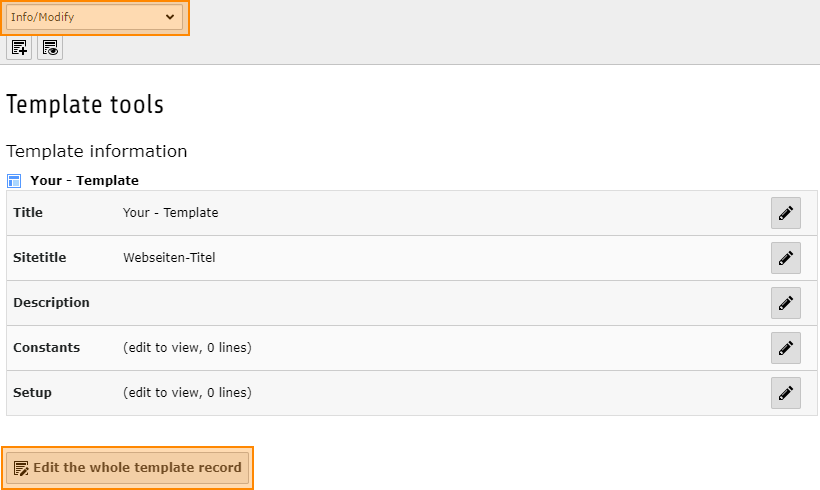
To configure TypoScript, open the Template module and switch to the page where your root template is located. Switch to the Info/Bearbeiten (Info / Edit) view and then click Vollständigen Template-Datensatz bearbeiten (Edit complete template record).
-
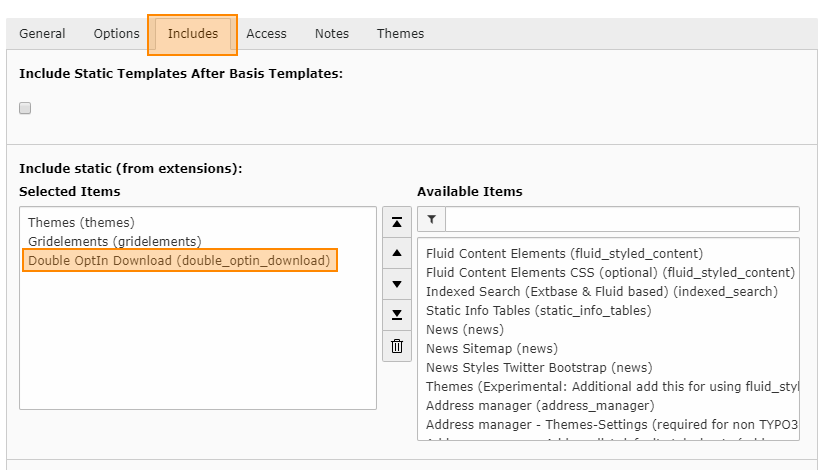
In this record, switch to the Enthält (contains) tab and in the Statische Templates einschließen (aus Erweiterung) (include static templates (from extension)) section select the entry Double-OptIn-Download (double_optin_download).
-
Save and close the record.

TYPO3 Double-OptIn-Download by coding.ms
Double-Optin-Download for TYPO3 lets you provide downloads through a request form and sends the download link by email after submission. Each link can be used exactly once. Required fields, forms, texts, and recipients can be configured per download collection, while backend management, logging, and email reports help organize and track download requests.